
Featurebase Integration
This guide will walk you through the process of connecting your Featurebase account to Ferndesk. This integration allows you to auto-update your help center using feedback, feature requests, and resolved support tickets from Featurebase.
Before you begin
You will need to have an active Featurebase account to complete this integration. If you don't have one, you can create one on the Featurebase website.
This integration requires a Featurebase API key, which you'll need to generate from your Featurebase dashboard.
Connection Steps
Navigate to the Integrations page in your Ferndesk settings.
Find Featurebase in the list of integrations and click "Connect".
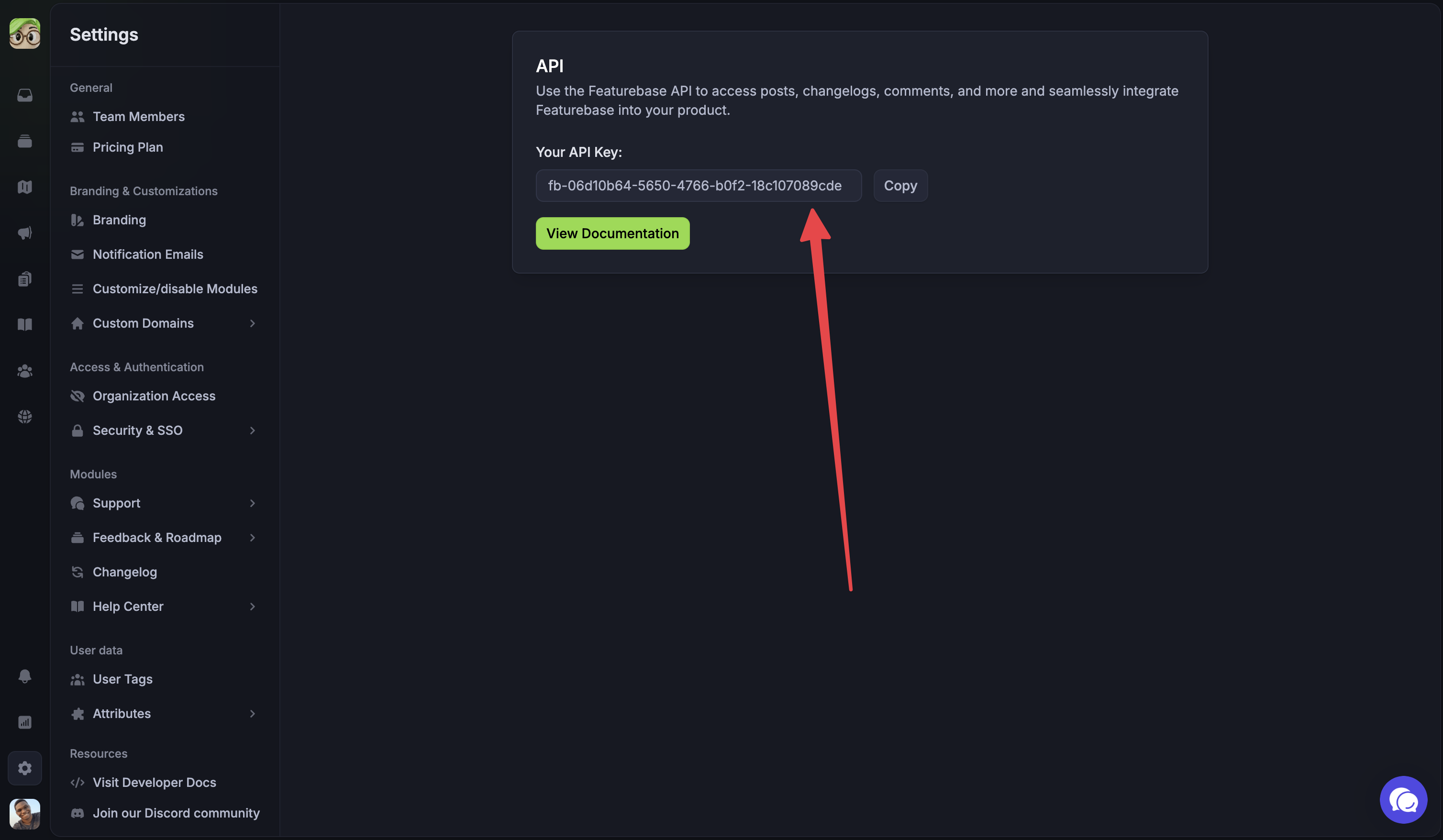
You will be asked to enter your Featurebase API Key. Here's how to find it:
Log in to your Featurebase account.
Click on Settings in the navigation menu.
Navigate to Advanced › API.
Your API key will be displayed on this page. Click the copy button to copy it to your clipboard.
Return to Ferndesk and paste your Featurebase API key into the connection dialog.
Click "Connect" to complete the integration.
Once connected, Fern will begin importing your resolved support tickets and feedback to identify documentation gaps and suggest updates to your help center.
Additional Resources
For more information on Featurebase's features and capabilities, you can visit their API documentation or help center.